
How do I handle free trials in Zuora?
Overview
Some businesses offer freemium or free trial plans as a way of letting prospective customers try out their products and services before purchasing. Free trials are a great way to attract new customers with the intention of upgrading such customers to a paid plan. Free trials can be time-limited, good for a certain duration of time, or they can be endless and never expire.
Free trials can be administered outside of Zuora or within Zuora:
- Administered outside Zuora: You can provision trial accounts for prospective customers completely outside Zuora, and later create the customer subscription in Zuora once the prospect decides to purchase your product.
- Administered inside Zuora: You can create the customer subscription (including collecting the prospect's credit card information) inside Zuora when the free trial begins, but have Zuora wait to charge the customer until the duration of the free trial has elapsed. This applies specifically to time-limited free trials with either an option to sign on for a paid plan or an automatic conversion to a paid plan (see below for more information on time-limited free trials).
Free Trial Options
Zuora offers multiple ways to offer free trials. The following sections provide examples of free trial options.
Endless Free Trial with the Option to Sign On for Paid Plan
The customer has a free trial to a basic version of the product which has a limited set of features and functionality. The free trial does not have an expiration date, and the customer can upgrade to a paid product at any time to access additional feaures and functionality. If they do not upgrade, they can continue to use the free trial version until otherwise notified by the service provider.
Managing Endless Free Trials (Non-Paying Customers) Outside of Zuora
Zuora recommends administering endless free trials (non-paying customers) outside of Zuora. When the customer decides to upgrade to a paid plan, you can create the paid subscription in Zuora and manage all billing and payments in Zuora. Endless free trials tracked in Zuora still require a subscription to be created for a $0 amount. These subscriptions also get picked up in billing runs and $0 invoices are generated. If you have a high volume of free trial subscriptions, you will be processing a lot of data and generating bills without any revenue. Thus, managing non paying customers in Zuora does have an impact on your billing operations - bill runs will take longer and you will need to sort out your reports to segment data for free trial versus paid customers.
Time-Limited Free Trial with the Option to Sign On for Paid Plan
The customer has a 30 day free trial for a basic product and after 30 days, the customer is notified their trial is expiring and given the option to to sign on for a paid plan (for the same version of the product they were using or a premium version) in order to continue using the product. If the customer does not sign up for a paid plan, their access to the product is disabled.
Time-Limited Free Trial with Automatic Conversion to a Paid Plan
The customer has a 30-day free trial for a basic product and after 30 days, customer is automatically converted to a paid plan.
When a customer signs up for a paid subscription, you can offer them the option to be billed on a monthly, quarterly, semi-annual, or annual period. Or, you can define a customer period such as every 13 months.
Things to Consider when Creating Free Trial Subscriptions
When creating a free trial subscription, you must consider how to use subscription dates and charge model types.
Subscription Dates
To support free trials in Zuora, we recommend using at least two of the three subscription (billing) trigger dates. Zuora provides three different dates to give you flexibility and control over when your subscription charges to begin billing.
For example, the Contract Effective Date can be the date the free trial begins and the Service Activation Date is when the customer begins paying for the product. In this case, a customer who signs up on January 1, 2019 for a 30-day free trial will have a contract effective date of January 1, 2019 and a Service Activation date of January 31, 2019 (the day after the 30 day free trial ends). On January 31, 2019, the customer is converted to a paid product and are immediately invoiced and charged for payment.
Charge Model Type
When you create a subscription for your free trial, you will add products and charges to the subscription. The free trial product can be created using a flat fee charge model with a flat fee amount of $0. Alternatively, you can use a discount charge model to display the regular charge amount and a corresponding discount amount.
For example: charge is $10 and discount is ($10), total amount = $0 = free trial. Whether you use flat fee charge model or discount charge model depends on your business rules and whether you want to show the customer the list price for the product in which they are getting for free during the trial period. The discount charge model allows you to control the duration of the discount, making it very easy to set a discount to expire after a specified period, for example, after one month, two months.
Examples of Free Trial Offers
The following three examples demonstrate how you can create free trial offers.
Example 1: 14 Day Free Trial with Automatic Conversion to Paid (Using Flat Fee Charge Model)
The customer has a 14 day free trial for the Bronze product package starting on January 1, 2019. After 14 days, the customer is automatically converted to a paid subscription for the same product billed on a monthly basis. At any time, the customer can choose to upgrade to either the Silver or Gold package.
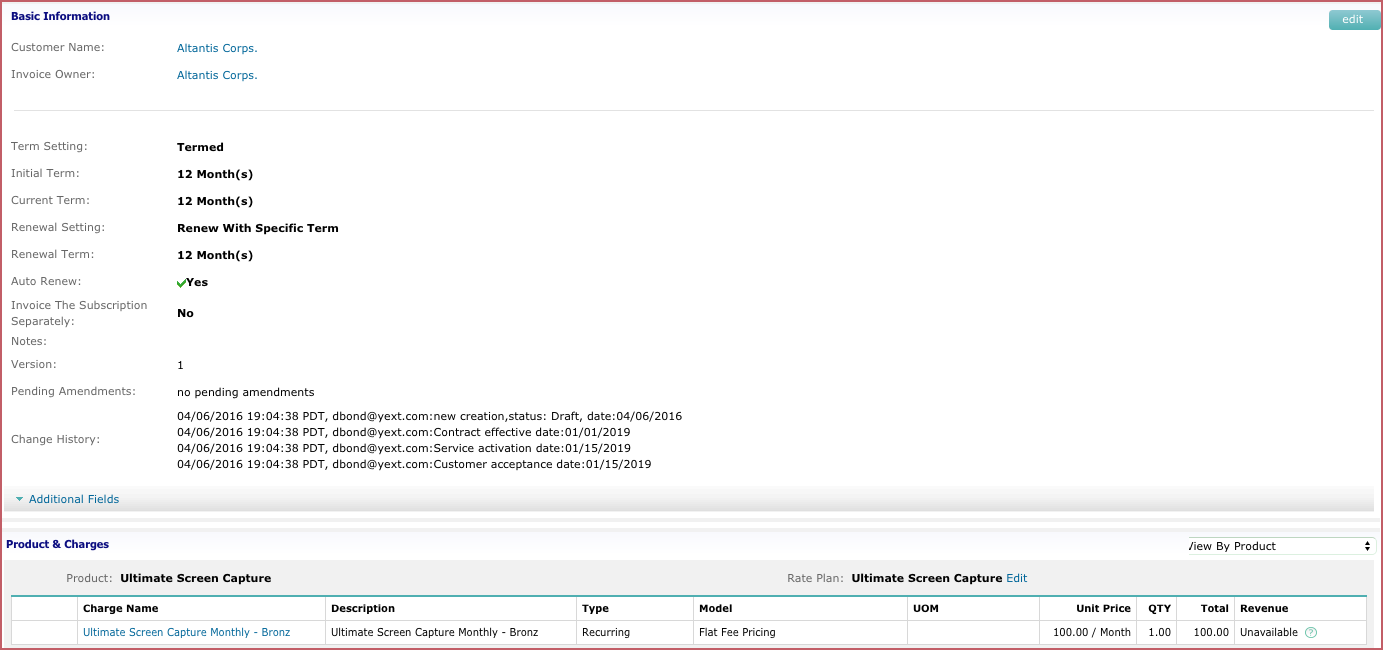
- Create a subscription with the free trial starting on January 1, 2019, and set the Contract Effective Date to January 1, 2019. This subscription begins on January 1, 2019 but does not start charging the customer until billing for the charge is triggered on the Service Activation date of January 15, 2019. By using two subscription trigger dates, you can track both when the free trial begins and when the paid subscription begins billing. Note that if you have over one charge within the subscription, all the charges must set to be triggered on the Service Activation date.
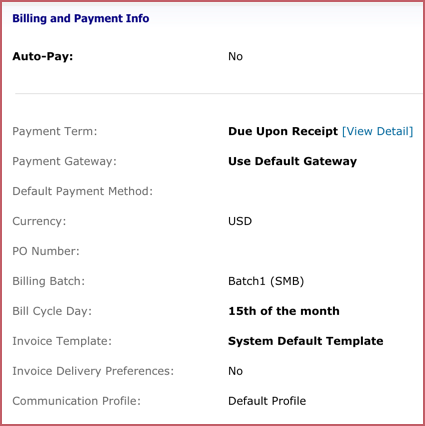
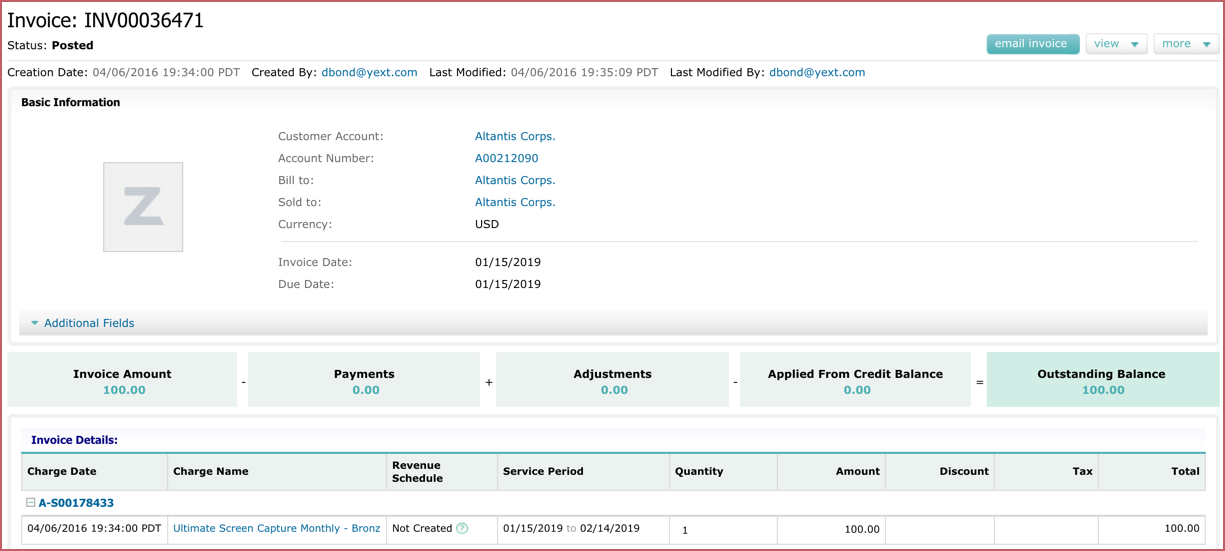
- The bill cycle day on the customer account is set to January 15, 2019 so when the invoice is generated, the service period is aligned with the bill cycle day and the customer is billed for the full service period for $100 rather than a prorated period.
Example 2: One Month Free Trial with Automatic Conversion to Paid (Using Discount Charge Model)
The customer has a one month free trial for a Bronze product package, starting on January 1, 2019. After one month, the customer is automatically converted to a paid subscription for the same product, billed monthly. At any time, the customer can choose to upgrade to the Silver or Gold package.
- Create a subscription with the free trial starting on January 1, 2019, and set the Contract Effective Date to January 1, 2019. The billing for the paid charge also begins on January 1, 2019 (the Service Activation Date). A discount is provided for the first month of service using the discount charge model. This discount automatically expires after the first month.
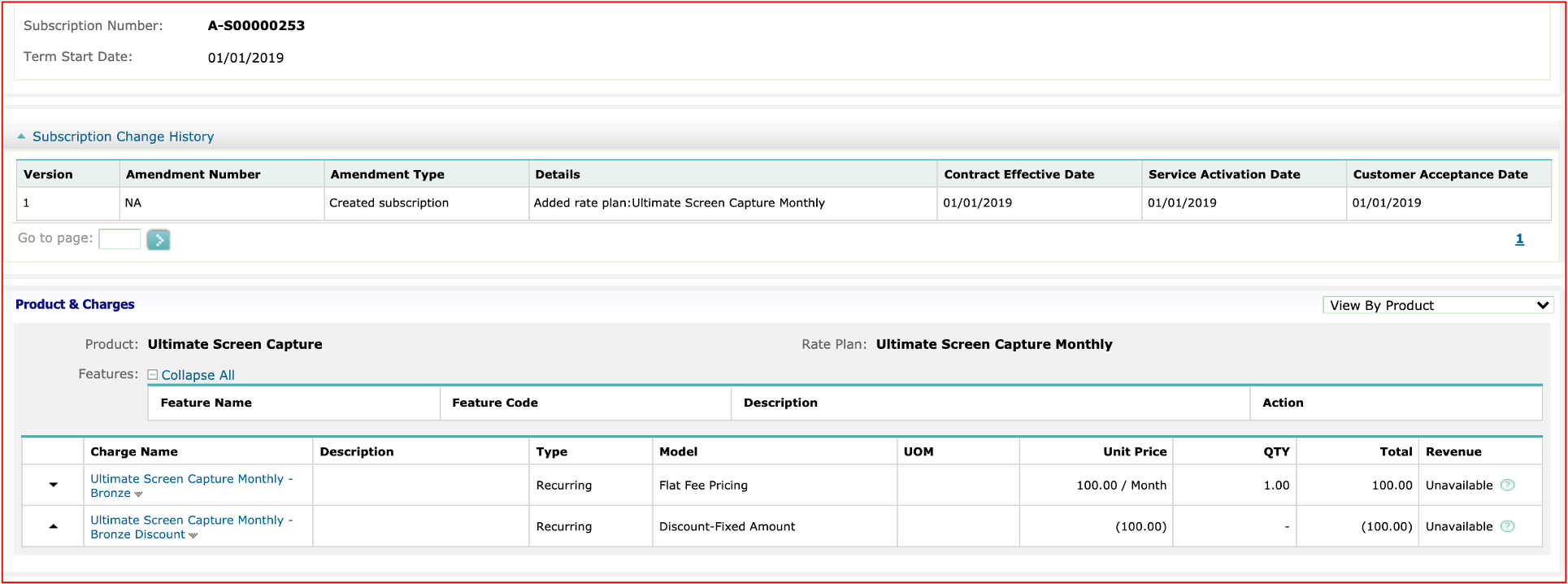
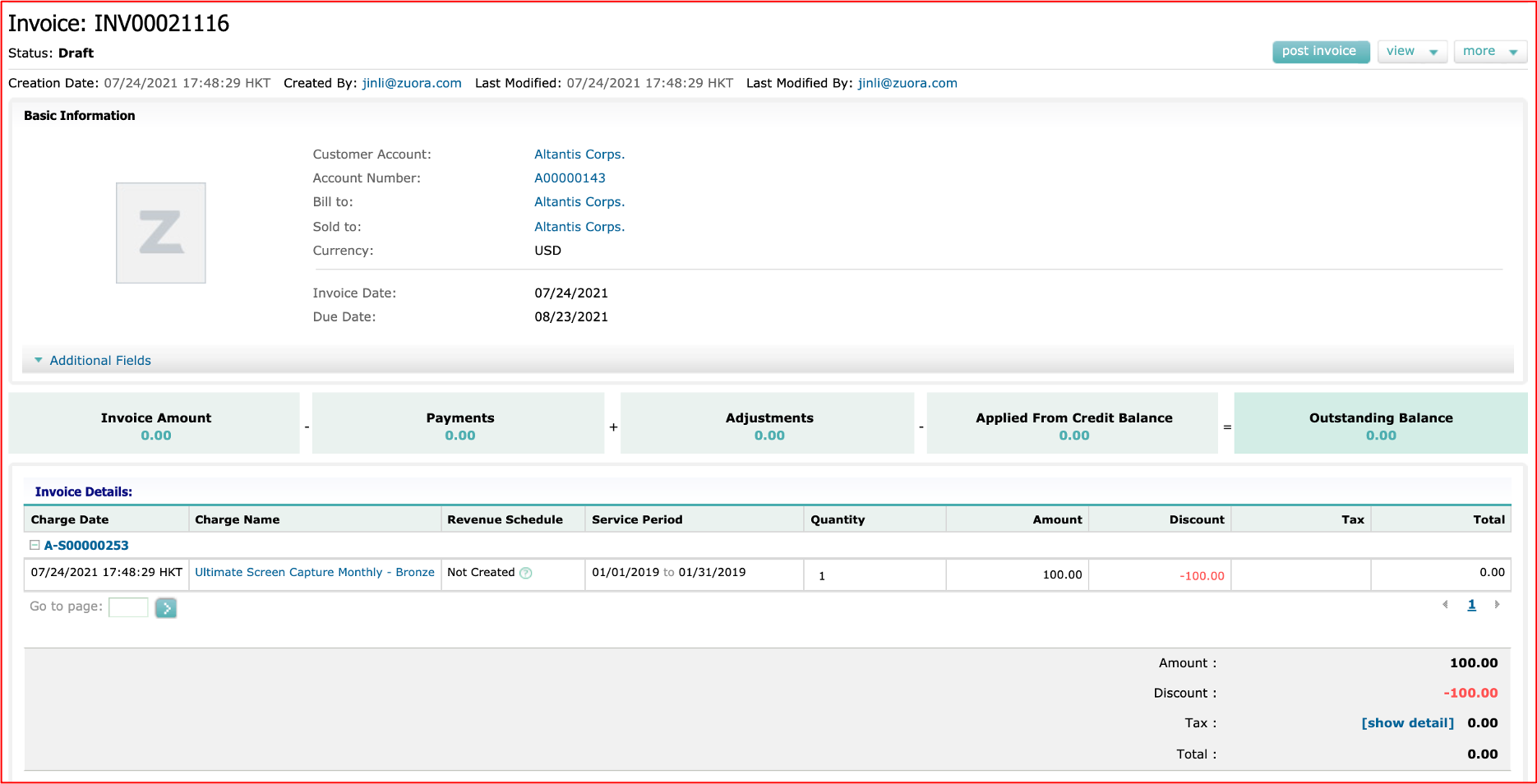
- This invoice shows the first month subscription cost of $100 with a discount of $100, resulting in the first month's subscription fees being $0 (free).
Example 3: One Month Free Trial with Option to Sign on for Paid Plan (Using Flat Fee Charge Model)
The customer has a one month free trial for the Bronze product package starting on January 1, 2019. After one month, the customer's free trial subscription term, which sets to one month, expires. Customer can renew the subscription for another 12 month subscription on a paid plan and customer chooses to renew with an upgrade to the Gold plan.
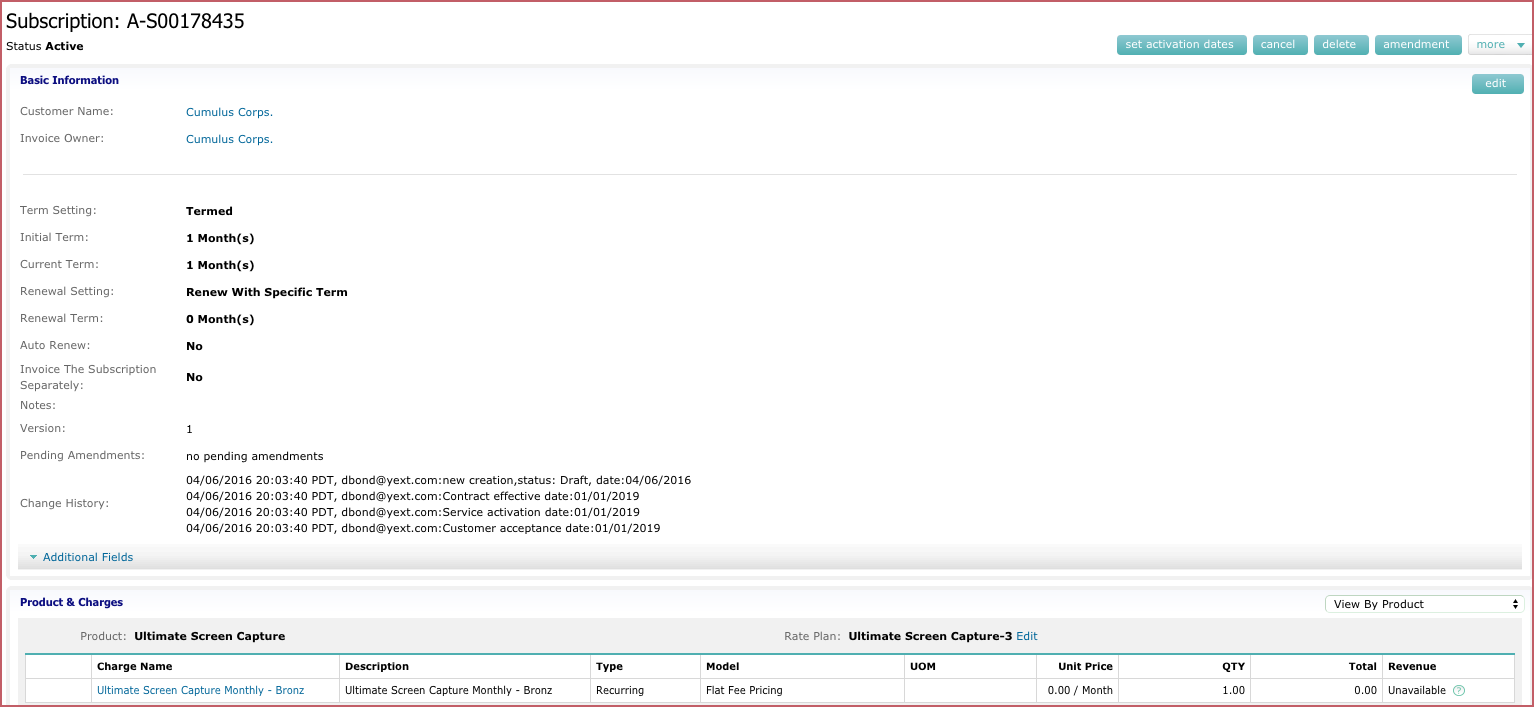
- This is the original subscription with a one month free trial starting on January 1, 2019 and expiring on January 31, 2019. The term is set to one month and does not auto-renew.
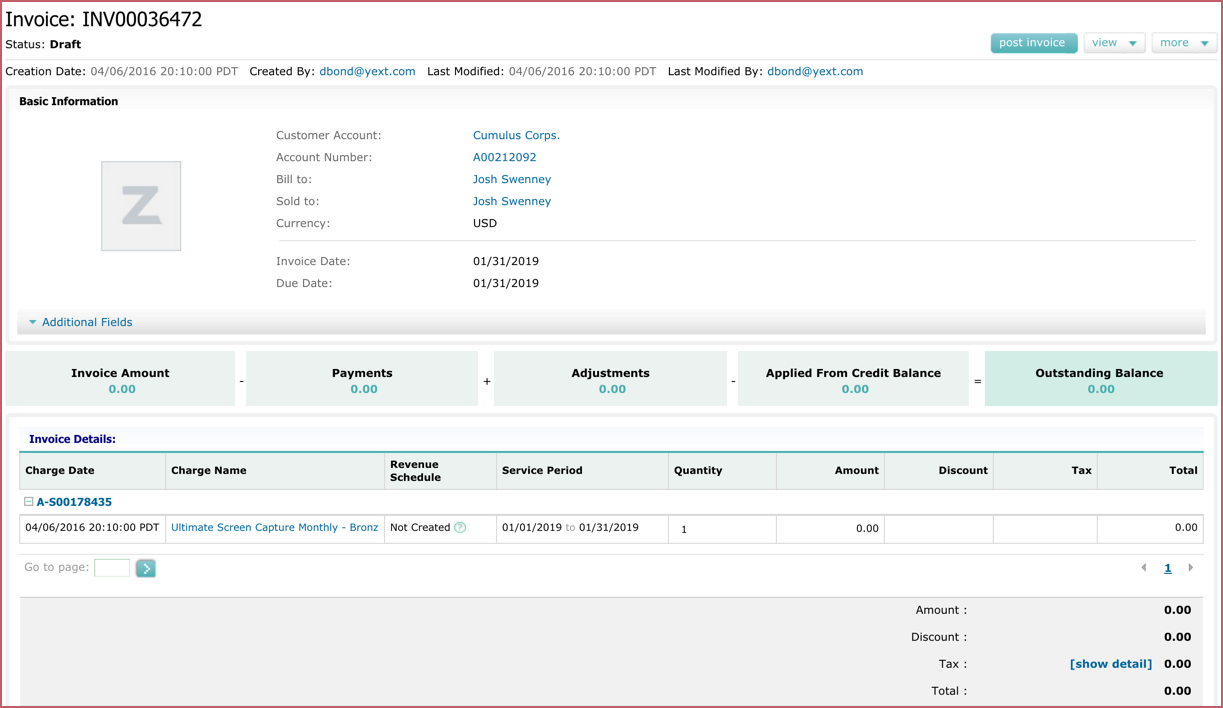
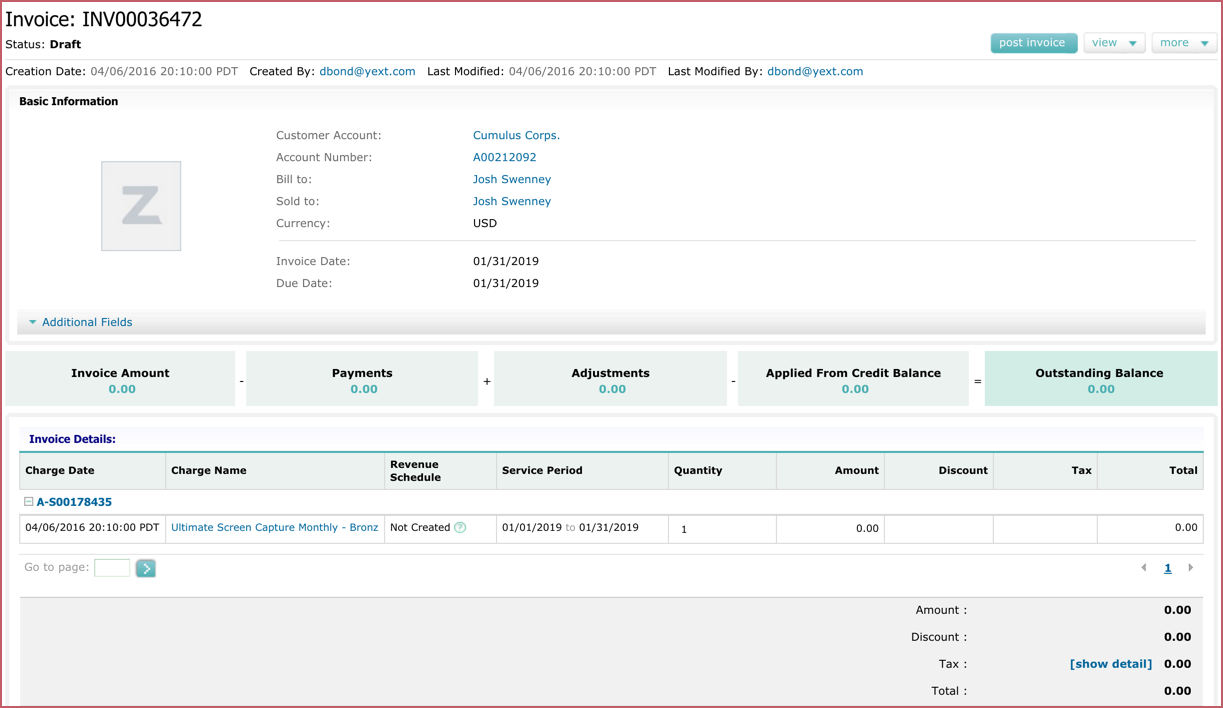
- This is the first invoice for the customer and shows a $0 charge since it's a free trial.
You can control whether or not invoices with a $0 Invoice Total Amount are sent customers by selecting or un-selecting the option in your billing run (under Processing Rules) for "Do not email invoices with 0 Invoice Total."
When the free trial expires, the customer decides to renew for an additional 12 month term and upgrade to the Gold plan. You will now create 3 amendments:- Remove the Bronze plan
- Extend the subscription term
- Add the Gold plan
All amendments will have a contract effective date and service activate date of February 1, 2019. This is the date the paid plan begins.
- Amend the subscription to remove the Bronze plan. Remember that the contract effective date and service activation date will both be February 1, 2019.
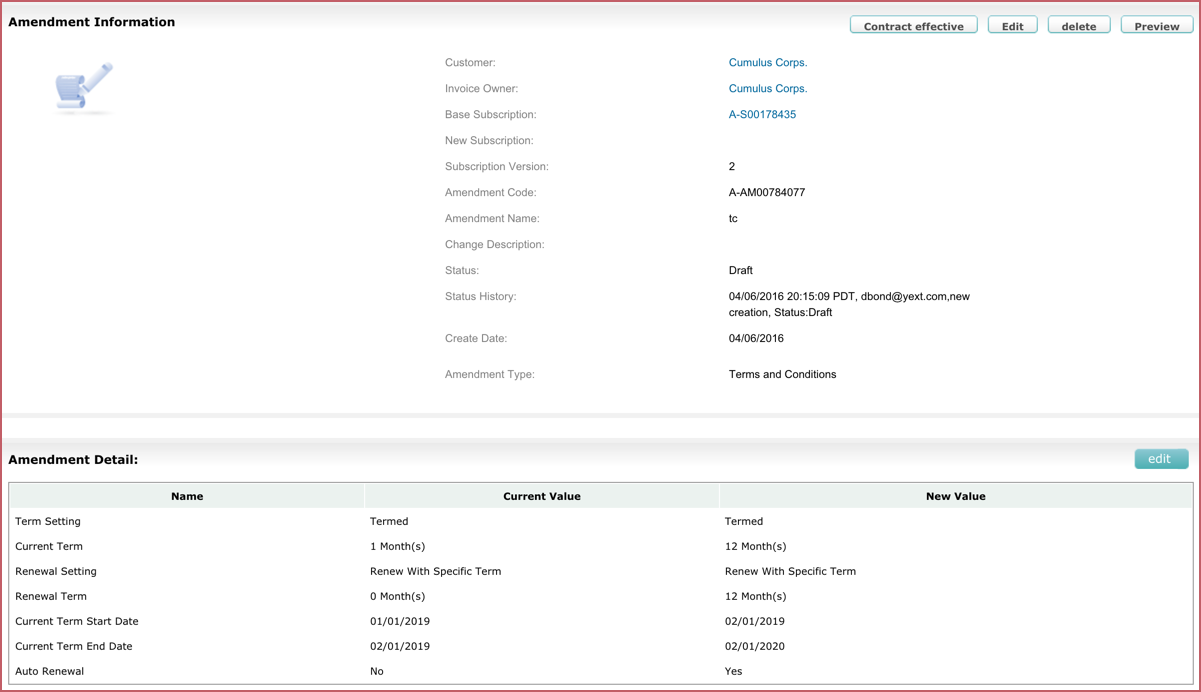
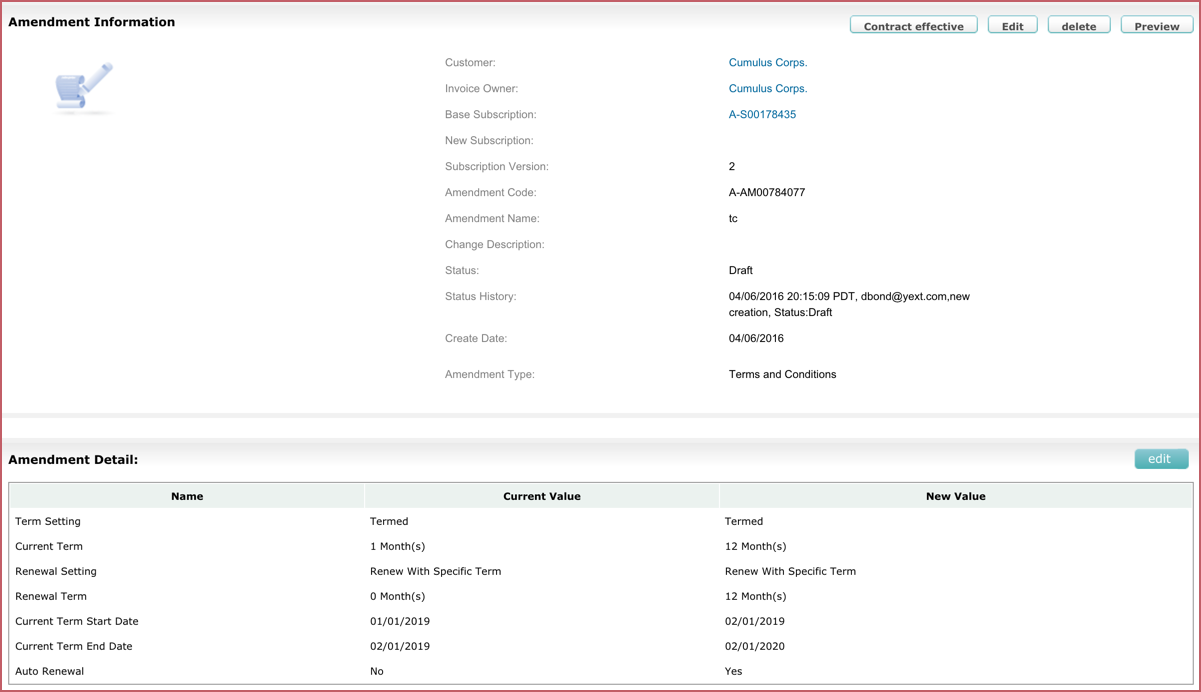
- Create another amendment to modify the Terms and Conditions on the subscription to reflect an additional 12 month term. Remember that the contract effective date and service activation date will both be on February 1, 2019.
- Create another amendment to add a new product and add the Gold plan to the subscription. You can modify the price and QTY of the charge if it is different from the list price and QTY in the product catalog. Remember that the contract effective date and service activation date will both be February 1, 2019.

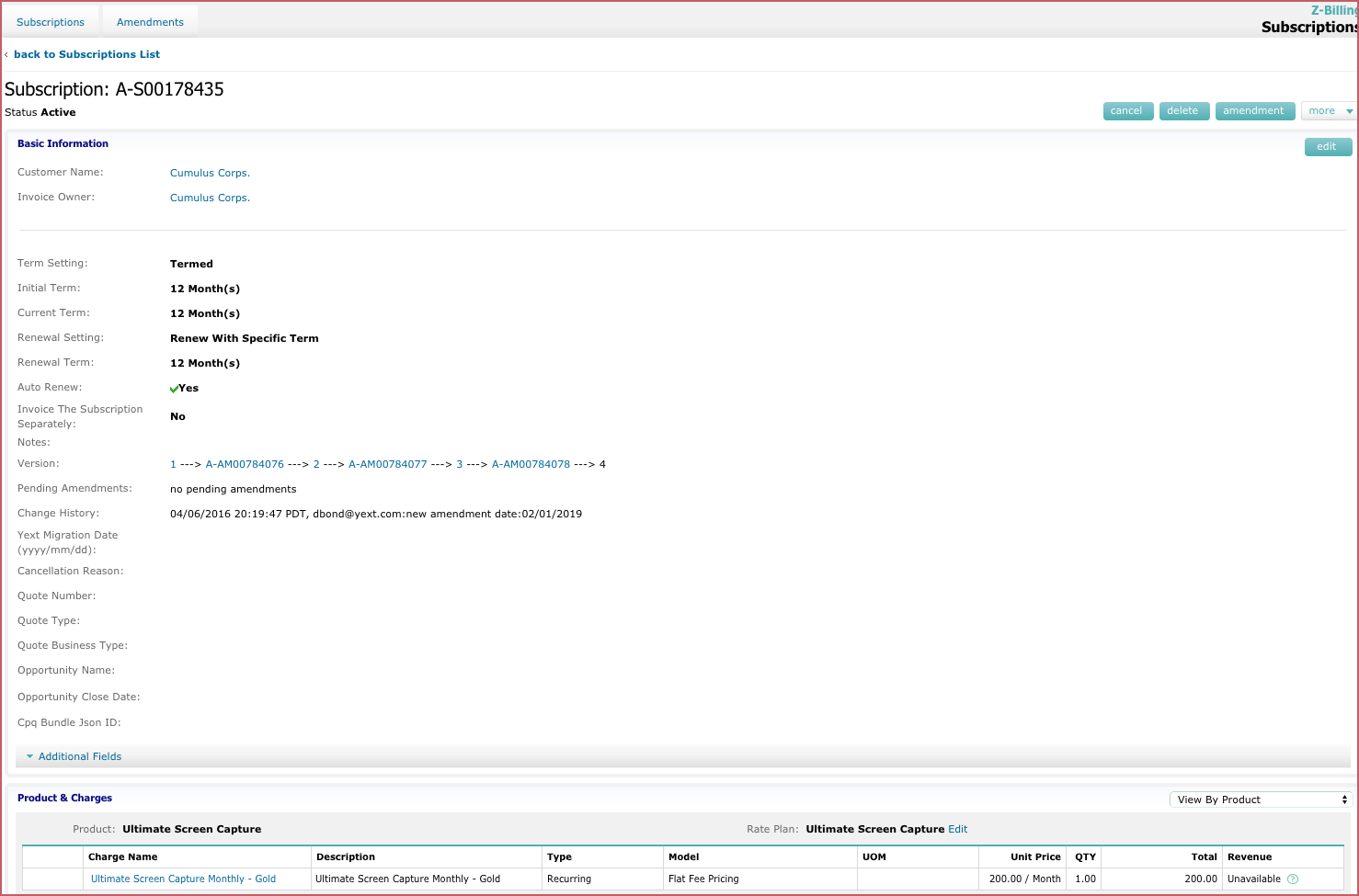
After you made the subscription amendments, subscriptions detail screen shows three amendments.
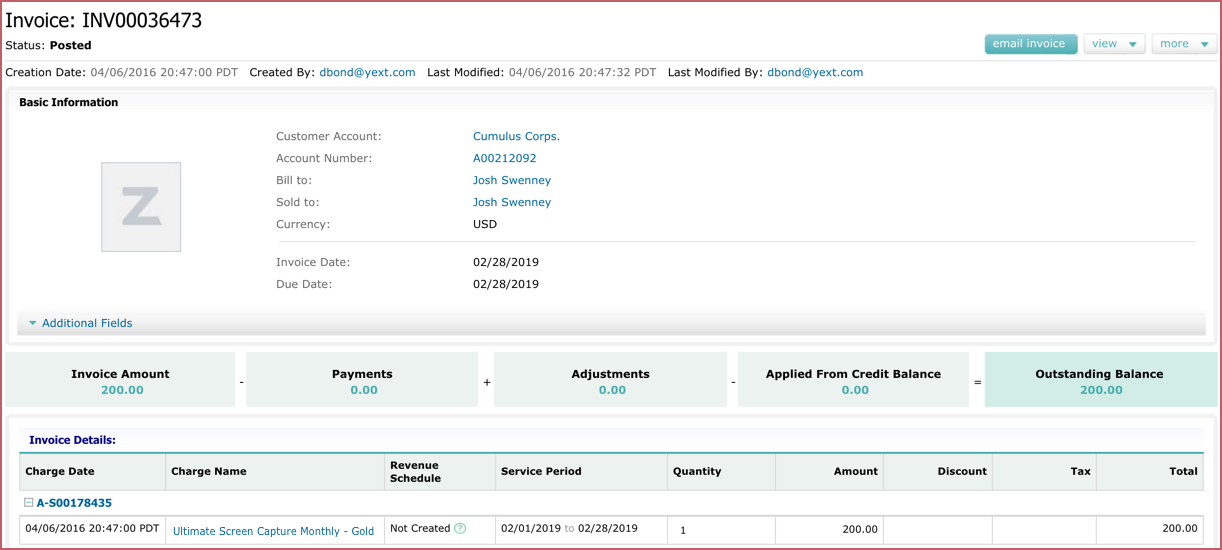
The first invoice for the paid subscription: